Companion mod · Minecraft Java
NetSchematic
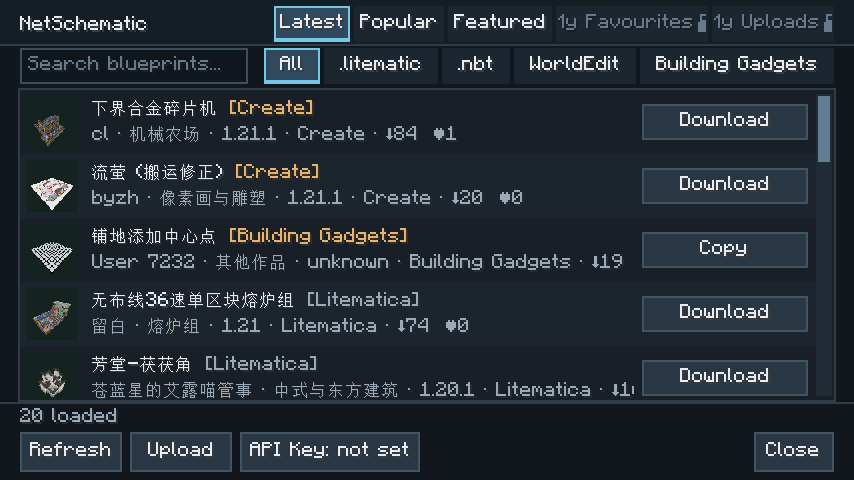
Press N in a world to find your next build. Check its size and materials before downloading a public schematic. No API key needed.
Check your version
Check the Minecraft version and loader for your instance in the launcher. Pick a file matching both, put the JAR in that instance’s mods folder, then launch the game.
| Loader | Minecraft | Minimum requirement |
|---|---|---|
| Fabric | 1.20 · 1.20.1 · 1.21 · 1.21.1 | Loader 0.15.11+ |
| Fabric | 26.1 · 26.1.1 · 26.1.2 · 26.2 | Loader 0.18.4+ |
| Fabric | 26.3 | Loader 0.19.3+ |
| Forge | 1.20.1 | Forge 47+ |
| NeoForge | 1.21.1 | NeoForge 21.1 |
| NeoForge | 26.2 | NeoForge 26.2.0.88+ |
| NeoForge | 26.3 | NeoForge 26.3.0.83+ |
On Fabric, install the matching Fabric API as well. Litematica is not required to browse or download schematics.
Where do downloads go?
NetSchematic finds schematics and downloads the original files. To see a projection in your world, open the .litematic in Litematica or Forgematica. The default paths below are relative to your game instance.
- Litematica / Forgematica
.litematic schematics/- Create
.nbt schematics/- WorldEdit
.schem config/worldedit/schematics/- Building Gadgets
- Copied to your clipboard. Paste it into the template manager.
Your library and uploads
To see your favorites or builds you’ve already uploaded in game, create an API key on the website with the relevant read permissions and paste it into the mod settings.
Manage API keysPublish new builds on the website. The in-game upload button opens the site; it does not upload local files.
Publish blueprint